

CAN看尚V50SD160电视MSD6A828刷机固件下载_U盘刷机固件升级包CAN看尚智能电视ROM固件介绍:适用机型:V50系列V50SD160机芯:MSD6A828前言:该固件为CAN看尚智能电...
CAN看尚V50SD160电视MSD6A828刷机固件下载_U盘刷机固件升级包
CAN看尚 V50SD160 U盘刷机固件 升级包 CANTV电视刷机包 电视刷机 固件下载 夸克网盘
- 下载量:4.68 K次
- 发 布:2026-10-01
手机扫码免费下载
纠错留言#CAN看尚V50SD160电视MSD6A828刷机固件下载_U盘刷机固件升级包简介
<table class="table table-bordered" id="pro_table">
<tbody>
<tr>
<td class="text-success text-center" rowspan="6" id="pro_img" width="40%">
<DIV style="LEFT: 0px; WIDTH: 300px; POSITION: relative; TOP: 0px; HEIGHT: 300px; ridge: ">
<DIV style="LEFT: 0px; POSITION: absolute; TOP: 0px;">
</img> </DIV>
<DIV style="LEFT: 16px; POSITION: absolute; TOP: 74px;">
</img>
</DIV></DIV>
</td>
<tr>
<td class="text-right">分类</td>
<td class="text-success"> >> <a class="text-success" href="/TVROM/">智能电视系统</a> >> <a class="text-success" href="/CANTVflash/">CANTV电视刷机包</a> </td>
</tr>
<tr>
<td class="text-right">类型</td
><td class="text-success">主程序
- 原厂
</td>
</tr>
<tr>
<td class="text-right">授权</td>
<td class="text-success">共享版
</td>
</tr>
<tr>
<td class="text-right">方法</td>
<td class="text-success">已关联FAQ方法</a></td>
</tr>
<tr>
<td class="text-right">更新</td>
<td class="text-success"> <span class="text-success">2019-07-06</span> </td>
</tr>
<tr>
<td colspan="3">
<div style="text-align:center;"><p style="pointer-events: none;" data="0" class="exts_gold"><span class="star" gold="5.0"></span> <small class="text-muted">5.0分/3人</small></p>
</div>
</td>
</tr>
</tbody>
</table>
</div
<div class="mt20" id="artbody">
<h2><span style="color: rgb(31, 73, 125);"><span style="box-sizing: border-box; font-size: 16px;">CAN看尚V50SD160智能电视ROM固件介绍:<br style="box-sizing: border-box; text-align: left;"/></span></span><span style="color: rgb(31, 73, 125);"><span style="box-sizing: border-box; font-size: 16px;"><br/></span></span></h2><h2><span style="color: rgb(31, 73, 125);"><span style="box-sizing: border-box; font-size: 16px;">适用机型:V50SD160</span></span></h2><h2><span style="color: rgb(31, 73, 125);"><span style="box-sizing: border-box; font-size: 16px;">机芯:MSD6A828</span></span></h2><h2><br style="box-sizing: border-box; font-size: 13.3333px; text-align: left;"/><hr style="box-sizing: content-box; height: 0px; margin-top: 20px; margin-bottom: 20px; border-right: 0px; border-bottom: 0px; border-left: 0px; border-image: initial; border-top-style: solid; border-top-color: rgb(238, 238, 238); font-size: 13.3333px;"/><span style="color: rgb(227, 108, 9);"><span style="box-sizing: border-box; font-weight: 700; font-size: 16px;">前言:</span><span style="box-sizing: border-box; font-size: 16px;">该固件为CAN看尚智能电视官方ROM固件包,针对CAN看尚V50系列V50SD160机型,MSD6A828机芯,请确认自己的设备型号为对应的型号,否则会刷入会导致黑屏等情况;</span></span><br style="box-sizing: border-box; font-size: 13.3333px; text-align: left;"/><br style="box-sizing: border-box; font-size: 13.3333px; text-align: left;"/><hr style="box-sizing: content-box; height: 0px; margin-top: 20px; margin-bottom: 20px; border-right: 0px; border-bottom: 0px; border-left: 0px; border-image: initial; border-top-style: solid; border-top-color: rgb(238, 238, 238); font-size: 13.3333px;"/><br style="box-sizing: border-box; font-size: 13.3333px; text-align: left;"/><span style="color: rgb(31, 73, 125);"><strong><span style="box-sizing: border-box; font-size: 16px;">固件升级说明:</span></strong></span></h2><p><span style="color: rgb(31, 73, 125); box-sizing: border-box; font-size: 16px;"></span><span style="font-size: 16px; color: rgb(0, 0, 0);">刷机前得准备电脑,u盘(2.0接口4G容量以上的)<br style="box-sizing: border-box; text-align: left;"/>注:为了让电视更好地识别可能要格式化,建议备份好U盘文件<br style="box-sizing: border-box; text-align: left;"/>按照刷机教程确认自己的机芯,即可进行刷机<br style="box-sizing: border-box; text-align: left;"/></span></p><p><span style="font-size: 16px; color: rgb(0, 0, 0);"><br/></span></p><hr/><p><span style="font-size: 16px; color: rgb(0, 0, 0);"><span style="font-size: 16px; color: rgb(255, 0, 0);">注意:中途不能拔插U盘和断电!以免变黑板<br style="box-sizing: border-box; text-align: left;"/>重启过后拔掉U盘!!删掉里面那几个刷机包!!不然下次开机又会重新刷机!</span></span><br/></p><h2 style="box-sizing: border-box; font-family: "Lantinghei SC", "Microsoft Yahei", "Hiragino Sans GB", "Helvetica Neue", Helvetica, Arial, sans-serif; font-weight: inherit; line-height: inherit; margin: 0px; font-size: inherit; position: relative; padding: 0px; text-align: left;"></h2><hr/><h2 style="box-sizing: border-box; font-family: "Lantinghei SC", "Microsoft Yahei", "Hiragino Sans GB", "Helvetica Neue", Helvetica, Arial, sans-serif; font-weight: inherit; line-height: inherit; margin: 0px; font-size: inherit; position: relative; padding: 0px; text-align: left;"><span style="box-sizing: border-box; font-weight: 700; font-size: 16px;"></span><br/></h2><h2 style="box-sizing: border-box; font-family: "Lantinghei SC", "Microsoft Yahei", "Hiragino Sans GB", "Helvetica Neue", Helvetica, Arial, sans-serif; font-weight: inherit; line-height: inherit; margin: 0px; font-size: inherit; position: relative; padding: 0px; text-align: left;"><span style="box-sizing: border-box; font-weight: 700; font-size: 16px; color: rgb(31, 73, 125);">ROM系统截图:</span></h2><h2 style="box-sizing: border-box; font-family: "Lantinghei SC", "Microsoft Yahei", "Hiragino Sans GB", "Helvetica Neue", Helvetica, Arial, sans-serif; font-weight: inherit; line-height: inherit; margin: 0px; font-size: inherit; position: relative; padding: 0px; text-align: left;"></h2><h2 style="box-sizing: border-box; font-family: "Lantinghei SC", "Microsoft Yahei", "Hiragino Sans GB", "Helvetica Neue", Helvetica, Arial, sans-serif; font-weight: inherit; line-height: inherit; margin: 0px; font-size: inherit; position: relative; padding: 0px; text-align: left;"><br/></h2><h2 style="box-sizing: border-box; font-family: "Lantinghei SC", "Microsoft Yahei", "Hiragino Sans GB", "Helvetica Neue", Helvetica, Arial, sans-serif; font-weight: inherit; line-height: inherit; margin: 0px; font-size: inherit; position: relative; padding: 0px;"><span style="box-sizing: border-box; font-weight: 700; font-size: 16px;"></span></h2><h2 style="box-sizing: border-box; font-family: "Lantinghei SC", "Microsoft Yahei", "Hiragino Sans GB", "Helvetica Neue", Helvetica, Arial, sans-serif; font-weight: inherit; line-height: inherit; margin: 0px; font-size: inherit; position: relative; padding: 0px; text-align: left;"><span style="background-color: rgb(255, 255, 0); color: rgb(255, 0, 0);"><strong><span style="background-color: rgb(255, 255, 0); box-sizing: border-box; font-size: 16px;">以上截图均收集于互联网,仅用于内容填充,可能与刷机后实际显示不符,如有介意切勿下载,否则概不负责!</span></strong></span></h2><p style="box-sizing: border-box; margin-top: 0px; margin-bottom: 10px;"><br style="box-sizing: border-box; text-align: left;"/></p> </div
<hr /><h2 style="font-size:18px;color:#0b3d91;margin:18px 0 8px;">电视刷机详细讲解图解</h2><p style="font-size:15px;color:#374151;">下面 6 张图按「准备 → 操作 → 排障 → 验收」的顺序整理,刷机前建议先完整看一遍。</p>
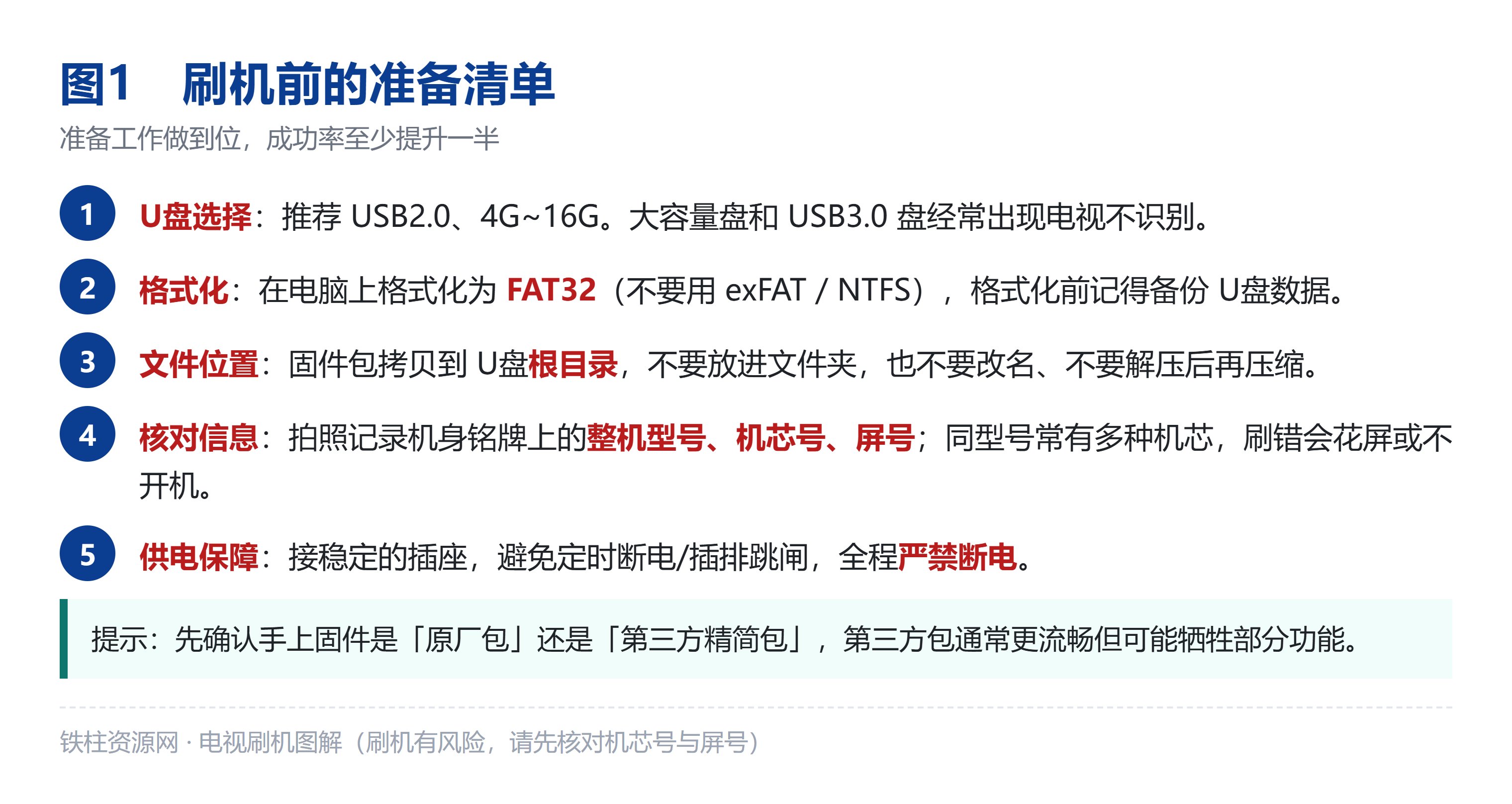
<p style="text-align:center;"><img src="https://www.sheliu.cn/zb_users/upload/2026/10/20261006171431179127807133596.png" alt="刷机前的准备清单:U盘选型、格式化、文件位置、供电保障" style="max-width:100%;height:auto;" /></p><p style="text-align:center;font-size:13px;color:#6b7280;">刷机前的准备清单:U盘选型、格式化、文件位置、供电保障</p>
<p style="text-align:center;"><img src="https://www.sheliu.cn/zb_users/upload/2026/10/20261006171431179127807187665.png" alt="U盘强刷完整流程:断电 → 拷固件 → 按键通电 → 刷写 → 拔盘 → 自检" style="max-width:100%;height:auto;" /></p><p style="text-align:center;font-size:13px;color:#6b7280;">U盘强刷完整流程:断电 → 拷固件 → 按键通电 → 刷写 → 拔盘 → 自检</p>
<p style="text-align:center;"><img src="https://www.sheliu.cn/zb_users/upload/2026/10/20261006171432179127807284876.png" alt="如何进入刷机 / Recovery:机身键法、遥控点按法、系统内升级" style="max-width:100%;height:auto;" /></p><p style="text-align:center;font-size:13px;color:#6b7280;">如何进入刷机 / Recovery:机身键法、遥控点按法、系统内升级</p>
<p style="text-align:center;"><img src="https://www.sheliu.cn/zb_users/upload/2026/10/20261006171432179127807217403.png" alt="常见失败现象速查:不识别、卡进度、卡LOGO、花屏、遥控失灵等" style="max-width:100%;height:auto;" /></p><p style="text-align:center;font-size:13px;color:#6b7280;">常见失败现象速查:不识别、卡进度、卡LOGO、花屏、遥控失灵等</p>
<p style="text-align:center;"><img src="https://www.sheliu.cn/zb_users/upload/2026/10/20261006171432179127807270009.png" alt="三条红线:禁断电、禁拔插U盘、不核对机芯不乱刷" style="max-width:100%;height:auto;" /></p><p style="text-align:center;font-size:13px;color:#6b7280;">三条红线:禁断电、禁拔插U盘、不核对机芯不乱刷</p>
<p style="text-align:center;"><img src="https://www.sheliu.cn/zb_users/upload/2026/10/20261006171432179127807223329.png" alt="刷完之后的验收清单:图像、声音、遥控、网络、投屏逐项确认" style="max-width:100%;height:auto;" /></p><p style="text-align:center;font-size:13px;color:#6b7280;">刷完之后的验收清单:图像、声音、遥控、网络、投屏逐项确认</p>
<div style="border:1px solid #E53333;border-left:6px solid #E53333;background:#FFF3F3;padding:12px 14px;margin:14px 0;border-radius:4px;"><p style="font-size:15px;margin:0 0 4px;"><strong>本资料为付费资源:¥9.9</strong></p><p style="font-size:14px;margin:0;color:#7f1d1d;">本套《电视刷机固件升级包》完整资料(机型参数 + 刷机步骤 + 6 张分步图解 + 故障排查)为本站整理制作,付费 ¥9.9 后即可获取下方夸克网盘直链;下单前请务必核对机芯号与屏号,支付后不支持无条件退款。</p></div>

评论列表 (0)